

MagSafe compatible means an accessory aligns magnetically with iPhone for secure attachment and charging.
If you wonder what does magsafe compatible mean, you are not alone. I help teams pick chargers and cases for field use. In this guide, I explain the tech, the labels, and the traps. By the end, you will know what to buy, what to avoid, and why it matters.
What MagSafe Actually Is
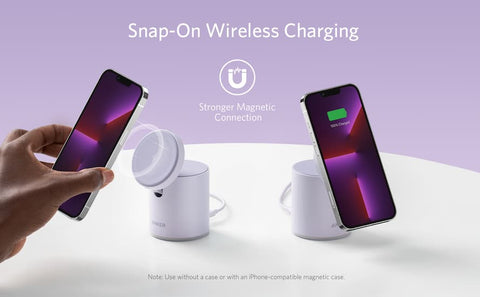
MagSafe is Apple’s magnetic system for iPhone. It started with iPhone 12 and newer models. A ring of magnets sits around the wireless charging coil. The ring pulls the phone to the right spot. That helps the charger line up and stay put.
A real MagSafe charger is Qi-based. It includes Apple’s secure parts to allow higher power. Many iPhones can get up to 15W with a certified puck. You also see a lock-on animation when it connects. Cases can be MagSafe too. They pass through the magnets and keep alignment.
Magnet strength, coil quality, and heat control affect results. Good alignment boosts speed. Poor alignment wastes energy as heat. That is why a solid puck feels better in use.
I have tested dozens of stands and pucks. The best ones snap cleanly and hold on without wobble. Cheap units slip or run hot. That hurts speed and may slow the charge curve.

What “MagSafe compatible” means in the real world
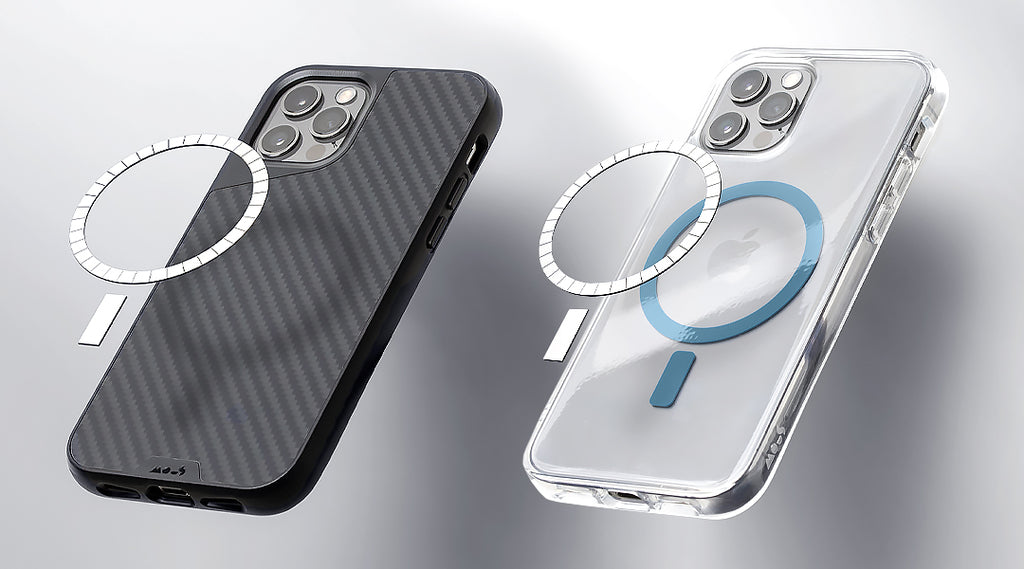
If you ask what does magsafe compatible mean, the answer depends on the seller. Many use the label for basic magnetic add-ons. These snap on but do not get full 15W speeds. Some use the label for Qi chargers with magnets. They align well but may cap at 7.5W on iPhone. Fewer products are fully certified by Apple.
So, what does magsafe compatible mean on a box? It often means magnets only. It may not mean Apple’s Made for MagSafe program. It may not mean the lock-on animation. It may not mean 15W.
Over time, the term got cloudy. Sellers chase clicks. They say MagSafe compatible when they mean magnetic only. Always read the fine print. Ask for speed claims and test data.
In my field kits, I label gear in three groups. Magnetic only. Magnetic with Qi power. Apple-certified MagSafe. That saves time and cuts confusion for new staff.
MagSafe compatible vs. Made for MagSafe vs. Qi2
Here is the clean split many people miss.
MagSafe compatible
- Uses magnets to align with the iPhone ring.
- May charge via Qi at 7.5W on iPhone.
- Often no Apple authentication, no lock-on animation.
- Good for mounts, grips, and wallets.
Made for MagSafe (Apple certified)
- Uses Apple’s spec and secure parts.
- Supports up to 15W wireless charging on many iPhones.
- Triggers the MagSafe animation and stable alignment.
- Best for fast, safe, and repeatable results.
Qi2
- The new wireless standard with magnets built in.
- Offers better alignment and up to 15W for supported phones.
- iPhone 15 series supports 15W on Qi2 chargers.
- A strong non-Apple option when you want magnetic 15W.
If you ask again what does magsafe compatible mean in 2024 and beyond, it now sits next to Qi2. Qi2 narrows the gap for speed. But Apple’s Made for MagSafe still wins for deep system features and wide case support.
Charging speeds, power, and heat explained
Wireless power is a balance. Speed, heat, and alignment must work together. A certified MagSafe puck can reach 15W on many models. Many MagSafe compatible pads top out at 7.5W. Qi2 chargers can hit 15W on supported phones.
Heat is the hidden tax. Thick cases slow charging. So do metal plates or card holders. Your phone will throttle if it gets hot. That keeps the battery safe.
Here is how to get better speed.
- Use a thin MagSafe case with no metal add-ons.
- Keep the phone and puck cool and clean.
- Use a power adapter that meets the maker’s spec.
- Set the stand angle so the magnets fully seat.
From my tests, ring alignment beats raw watt claims. A great 7.5W pad with perfect lock can beat a poor 15W puck. If you ask what does magsafe compatible mean for speed, it means alignment first, labels second.
How to check if a product is truly MagSafe compatible
Packaging words can be fuzzy. These checks help.
- Look for the exact claims. 15W on iPhone, MagSafe animation, or Made for MagSafe seal.
- Check for Qi2 certification if it is not Apple certified.
- Inspect the magnet ring and its center bump. It should match the iPhone pattern.
- Test snap force. The grip should be firm and even, with no sliding.
- Try a slight twist. A good ring resists rotation when docked.
- Watch your phone for the lock-on animation. Many non-certified units will not show it.
- Measure heat after 10 minutes. Warm is fine. Very hot is not.
When a buyer asks what does magsafe compatible mean for cases, I say test the snap with a bare iPhone first. Then add the case. If lock drops a lot, skip that case.
Real-world uses and setups
Desk charging
- A MagSafe stand keeps the screen in view.
- Use it for calls, timers, or notes.
- Choose a stable base to stop wobble.
Nightstand
- A soft-tilt stand helps you find the puck in the dark.
- Use a low-brightness clock mode to cut heat.
- Make sure the magnets hold through your case.
Car mounts
- Choose a vent or dash mount with strong magnets.
- Look for Qi2 or certified MagSafe if you need power.
- Avoid rough roads with weak rings.
Travel and work
- A folding puck saves space.
- Use a cable with a solid strain relief.
- Test with a power bank before the trip.
I take one certified MagSafe puck and one small Qi2 stand. That covers hotels and rental cars. If a teammate asks what does magsafe compatible mean for travel, I say it means less fiddling and faster setup.

Buying checklist and pitfalls
Use this quick list when you shop.
- Confirm the goal. Fast charge or just a strong mount.
- Check labels. Made for MagSafe, Qi2, or magnetic only.
- Verify 15W claims for iPhone if speed matters.
- Confirm adapter needs. Many pucks need 20W or more.
- Mind case thickness. Over 2 mm can hurt alignment.
- Avoid metal plates under the case.
- Read return terms. Test snap, heat, and speed at home.
A final note on words. Many pages use what does magsafe compatible mean as bait. Read beyond the header. Ask for numbers and charts.

Care, safety, and troubleshooting
Keep your gear clean. Dust on the ring can raise heat. Wipe with a dry cloth. Do not use harsh cleaners.
If charging is slow, try these quick fixes.
- Remove the case and test again.
- Move off soft surfaces that trap heat.
- Use a better power adapter.
- Update iOS and the charger firmware if supported.
Wallet notes matter too. Strong magnets can harm stripe cards. Use shielded wallets made for MagSafe. If a friend asks what does magsafe compatible mean for wallets, I say pick gear with tested shielding and tight grip.
Frequently Asked Questions of what does magsafe compatible mean
What does MagSafe compatible mean on a charger?
It means the charger has magnets that align with your iPhone. It may not be Apple certified or support 15W speeds.
Does MagSafe compatible guarantee 15W charging?
No, it does not. You need Made for MagSafe or a Qi2 charger on a supported iPhone for 15W.
Will a MagSafe compatible case improve charging?
It can help alignment and stability. Speed still depends on the charger, power adapter, and heat.
Is Qi2 the same as MagSafe?
Qi2 is a standard that adds magnets and better alignment. MagSafe is Apple’s system with its own rules and features.
How do I know if my accessory is certified?
Look for the Made for MagSafe badge or Qi2 certification. Check the maker’s specs for 15W on iPhone and verify user tests.
Does a MagSafe compatible wallet damage cards?
Modern wallets add shielding to protect cards. Keep magnetic stripe cards away from strong bare magnets to be safe.
Can older iPhones use MagSafe accessories?
They can attach to magnetic mounts but may not charge well or at all. Only iPhone 12 and newer support MagSafe alignment for charging.
Conclusion
Now you can answer what does magsafe compatible mean with confidence. It signals magnetic alignment, but not always full speed or Apple-level features. Look for Made for MagSafe or Qi2 if you want 15W and stable performance.
Use the checklists above on your next buy. Test snap strength, heat, and speed in your setup. Share your results and help others shop smarter. Subscribe for more gear breakdowns, or leave a comment with your questions and wins.


