
Paperwhite offers a higher-resolution screen, waterproofing, and premium features over the basic Kindle.
I’ve tested both devices across months of reading, testing settings, and comparing comfort during long sessions. I’ll explain what is the difference between amazon kindle and paperwhite with clear, practical detail. You’ll learn the technical differences, real-world pros and cons, and how to pick the right model for your reading habits. My goal is to equip you to decide which device fits your life and budget.

Kindle vs Paperwhite: Quick overview
The short answer to what is the difference between amazon kindle and paperwhite starts with the core promise: both are e-readers, but Paperwhite targets serious readers with better screens and more features. The Kindle (basic) is an entry-level device made for casual reading and price-conscious buyers.
Key points to note:
- Basic Kindle aims for affordability and simplicity.
- Paperwhite offers a sharper display, improved lighting, and extra durability.
- Paperwhite models often include more storage and advanced options such as warm light and waterproofing.
This section frames the rest of the article and helps you see the practical contrasts. Read on to get deeper, hands-on comparisons that match real reading needs.

Design and display differences
Screen quality is the most visible answer to what is the difference between amazon kindle and paperwhite. Paperwhite typically uses a higher-resolution e-ink display that renders text crisper and more like printed paper. The basic Kindle has a capable display, but letters can appear less sharp at small font sizes.
Other design differences include:
- Lighting: Paperwhite usually has more LEDs and options like adjustable warm light. The basic Kindle has a front light but fewer adjustment levels.
- Build: Paperwhite often has a flush-front glass design and a slightly more premium feel. The basic Kindle uses a simpler plastic bezel.
- Size and weight: Paperwhite can be a bit heavier depending on model and battery, but the difference is usually small.
If you read small fonts or want the closest thing to a paper page, Paperwhite wins for display comfort. The basic Kindle remains a solid choice for simple, portable reading.
Performance, battery life, and storage
Performance differences matter when you use advanced features. Answering what is the difference between amazon kindle and paperwhite includes looking beyond the screen to speed and capacity.
Practical differences:
- Responsiveness: Paperwhite tends to feel snappier when turning pages and navigating menus, especially on higher-end Paperwhite models.
- Battery: Both last weeks on a charge with typical use. Paperwhite may last longer under heavy lighting because its battery is often slightly larger.
- Storage: Paperwhite models often offer larger storage options suitable for audiobooks or large collections. Basic Kindles cover most users with smaller storage tiers.
For everyday readers, both devices are efficient. If you keep audiobooks or a large library, Paperwhite’s storage and sometimes Bluetooth improvements are useful.
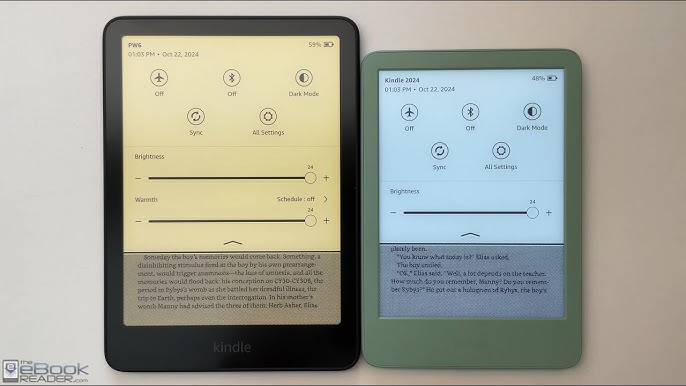
Features, ecosystem, and reading experience
When thinking what is the difference between amazon kindle and paperwhite, consider features that shape daily use. The core Kindle ecosystem—Kindle Store, cloud sync, and reading apps—works the same across devices. But Paperwhite adds comfort and convenience features.
Important features to compare:
- Waterproofing: Paperwhite models often include waterproof protection, making them safer for pool or bathtub reading. Basic Kindle usually lacks this.
- Warm light and auto-adjust: Paperwhite commonly offers warm light and auto-brightness. These reduce eye strain in low light.
- Audiobooks and Bluetooth: Both support audiobooks over Bluetooth, but Paperwhite can have more storage for audiobook files and smoother playback on certain models.
These differences affect how and where you read. If you like reading outdoors, at the beach, or in the tub, Paperwhite’s extra protection is a major plus.
Price, value, and which should you buy
Price often decides the winner. To answer what is the difference between amazon kindle and paperwhite in purchasing terms, weigh cost against features you’ll actually use.
Consider this when choosing:
- Budget readers: Choose the basic Kindle if price is the main concern and you read mostly at home.
- Frequent or long-session readers: Paperwhite offers better display clarity and lighting for long sessions.
- Travelers and outdoors readers: Paperwhite’s waterproofing and rugged design give more peace of mind.
Think about lifetime value. Spending more on Paperwhite can be worth it if you read daily and want fewer compromises.

My experience, tips, and mistakes to avoid
I’ve used both devices for months and learned a few practical lessons that answer what is the difference between amazon kindle and paperwhite in real life.
Lessons learned:
- Turn on warm light at night. I cut late-night eye strain and slept better by using Paperwhite’s warm light feature.
- Don’t overbuy storage. Most people won’t fill large storage tiers unless they keep audiobooks offline.
- Protect the Kindle even if it’s cheaper. A good cover extends usable life, especially for basic Kindles without waterproofing.
- Test display settings. Font size, weight, and the margin settings change how crisp a page feels.
A common mistake is choosing based only on price. I once bought the basic Kindle for travel and missed Paperwhite’s waterproofing on a beach trip. If you read in varied environments, invest in Paperwhite.

Frequently Asked Questions of what is the difference between amazon kindle and paperwhite
What is the main technical difference between Kindle and Paperwhite?
Paperwhite generally has a higher-resolution screen and more front LEDs for a brighter, crisper display. It often has additional features like waterproofing and warm light that the basic Kindle lacks.
Are Paperwhite and Kindle compatible with the same Kindle books?
Yes. Both devices use the same Kindle ecosystem and can access the same purchased books, cloud library, and reading settings. Collections and notes sync across devices with the same Amazon account.
Is Paperwhite worth the extra cost over a basic Kindle?
Paperwhite is worth the extra cost if you read frequently, want a sharper screen, or need waterproofing. For occasional readers or tight budgets, the basic Kindle covers core reading needs.
Can I listen to audiobooks on both devices?
Both devices support audiobooks using Bluetooth headphones or speakers. Paperwhite may offer smoother playback and more storage options on higher models.
Which device has better battery life, Kindle or Paperwhite?
Both have long battery life measured in weeks with typical use. Paperwhite sometimes lasts longer under heavy lighting due to larger batteries, but real-world results depend on usage patterns.
Does Paperwhite have a color screen?
No. Both Paperwhite and basic Kindle use monochrome e-ink screens designed to mimic paper and reduce eye strain. Color e-ink options are rare and not standard on these models.
Conclusion
Choosing between the basic Kindle and Paperwhite comes down to how and where you read. The Paperwhite elevates comfort with a sharper screen, better lighting, and waterproofing. The basic Kindle delivers core reading features at a lower price and remains a solid choice for casual readers.
Decide by matching features to your habits. If you read every day, travel with your device, or read by the pool, Paperwhite is likely a better investment. If you want a simple, affordable reader for occasional use, the basic Kindle will serve you well.
Try one small step: list how, where, and when you read for a week. Use that list to choose the model that fits your life. Share your choice or questions below and I’ll help you refine it.